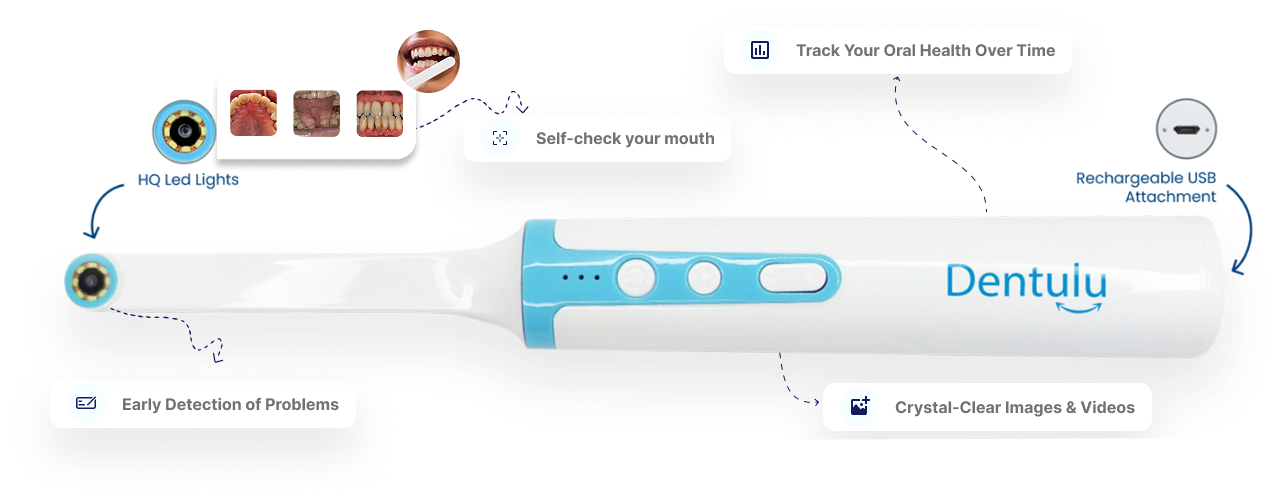

A sore spot, a chipped tooth, or a child’s hard-to-see back molar can leave you wondering what to do next. An at-home intraoral camera, sometimes called a teeth camera or tooth camera, can help you capture views of your mouth and share them with a dental professional.
The right camera should be practical to use, compatible with your devices, and straightforward to clean. It should also come with clear limits: a home camera is a monitoring and communication tool, not a diagnostic device. It does not replace a clinical exam or dental X-rays. The American Dental Association says dentists using teledentistry must have enough information to make clinical decisions and are responsible for deciding whether the records are sufficient. (ADA Policy on Teledentistry)
Here are five things to check before you buy.
A camera’s megapixel count is only one part of a useful image. You also need a lens that can focus at the distance you’ll use it, lighting that helps you see inside your mouth, and a clear live preview so you can position the camera.
Before choosing, look for:
As one product example, Dentulu lists MouthCAM with 2-megapixel, 1920 × 1080 capture, adjustable LED lights, and a 3–50 mm focus range. Those are product specifications, not a promise that every image will be clear or that the camera can identify a condition. (MouthCAM product details)
Good technique matters, too. Dentulu’s photo consultation tips recommend good lighting, keeping the area in focus, and taking both a wider view and a close-up. Ask your dentist which angles would be most useful for your concern.
A wired intraoral camera connects to a device by cable. A wireless intraoral camera sends images to a compatible device without a camera cable connecting the two. Neither option is automatically better for everyone.
| Consideration | Wired camera | Wireless camera |
|---|---|---|
| Connection | Uses a cable, often USB | Connects wirelessly; may need charging |
| Best fit | You expect to use it in one place and your devices support its connection | You want more freedom to move while positioning it |
| Check before buying | Cable length, port, operating-system and phone compatibility | App or connection requirements, phone compatibility and charging |
Compatibility can vary between models, even within the same product line. Dentulu lists MouthCAM wired and wireless versions with different device requirements, so check the current MouthCAM specifications against your phone, tablet, or computer before ordering.


A camera may have appealing specifications but still be difficult to position in your own mouth. Look for clear setup instructions and controls you can operate while holding the device. Check whether the camera’s shape and length seem practical for the views you want to capture.
Think about how you’ll use it:
An at-home camera may be useful for parents who want to share a view of a child’s teeth, for someone tracking a visible change between visits, or for anyone preparing images to discuss with a dentist. It can help you communicate what you see; it cannot confirm what is causing a symptom.
A camera is most useful when you can get the images to the person who needs to review them. Before buying, check whether it saves photos or video in a format your device can open and whether you can upload them through your dentist’s preferred service.
The ADA describes teledentistry as including live video visits and the secure transmission of recorded information, such as photographs, for a dentist to review. The dentist decides whether the information available is enough to provide care remotely or whether an in-person visit is needed. (ADA Policy on Teledentistry)
With Dentulu, you can learn about options for a virtual dental consultation or a photo consultation. Ask the provider how to submit your images; use the service or secure method they recommend rather than assuming every camera works with every app.
A simple workflow:
Anything used in the mouth needs a clear hygiene plan. Check which parts contact your mouth, whether any tips or heads are single-use, and how the reusable parts should be cleaned. Don’t assume a camera can be immersed, sterilized, or cleaned with any household product.
Dentulu lists disposable mirror heads with MouthCAM. Follow the instructions for the exact model you buy, including how to handle each part after use. The CDC’s dental infection-control guidance explains that cleaning and reprocessing requirements depend on the item and how it is used. (CDC: Sterilization and Disinfection)
If the product instructions do not clearly explain safe use and cleaning, contact the manufacturer before using it. Never share a mouth-contact part between people unless the manufacturer specifically explains how it should be reprocessed.

A camera can help you document what is visible and make it easier to show a dentist the area you’re concerned about. It can support a conversation or help you compare images over time when a dental professional has suggested monitoring.
But a photo cannot show everything a dental professional may need to assess. The camera does not take X-rays or provide a hands-on exam. A dentist may ask you to come in if the image is unclear, your symptoms need further assessment, or treatment requires an in-person visit. That is a normal part of using remote care responsibly. (ADA Policy on Teledentistry; Dentulu’s guide to teledentistry)
Not necessarily. It may be helpful if you regularly need to share clear views with a dentist, are monitoring a specific visible area with professional guidance, or want help showing a child’s dental concern. If you are unsure whether you would use one, ask your dentist whether home images would be useful for your situation.
No. A camera lets you capture images; it does not diagnose a cavity. A dentist must decide what the images show and whether an exam, X-rays, or other assessment is needed. (ADA Policy on Teledentistry)
It depends on your devices and preferences. Wireless may offer more freedom to move, while wired models use a direct cable connection. Compare compatibility, setup, and charging needs before choosing.
You can ask the dentist or service whether they accept images from your camera and how to share them. A camera can support the discussion, but the dentist may still recommend an in-person exam or X-rays.
Don’t rely on the image alone to decide what it is. Note what you see and any symptoms, then contact a dental professional for guidance. If the dentist needs more information, follow their recommendation for in-person care.
Before you choose an at-home intraoral camera, confirm that it fits your device, feels manageable to position, captures the views you need, and has clear cleaning instructions. Then check how you can share images with your dentist.
MouthCAM is Dentulu’s at-home camera option, available in wired and wireless versions. You can review the current MouthCAM details and decide whether it fits your routine. Use it to support communication and monitoring, not as a replacement for professional dental care.

 Patient Subscription
 Dental Professionals
 Vendors